
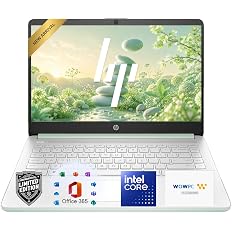
HP 14 Laptop with Intel N150, 4GB RAM and 128GB SSD
Verdict: This HP 14 is aimed at buyers who need a simple Windows laptop for everyday computing rather than a high-performance machine. The configuration combines an Intel N150 processor, 4GB of DDR5 memory, a 128GB SSD, and a 14-inch HD display. At $299.99, the appeal is the low entry price, but the 4GB RAM and 128GB storage are important limitations to understand before buying.
What You’re Actually Getting
This is a compact 14-inch HP laptop built around Intel’s N150 processor. The listed configuration includes 4GB of DDR5 RAM and a 128GB SSD, with Windows 11 as the operating system. It also includes 1TB of cloud storage and one year of Microsoft 365 according to the product listing information available for this ASIN.
Why This Deal Is Worth a Look
The strongest reason to consider this laptop is its straightforward everyday-use configuration. The Intel N150 is designed for efficient basic computing, while the SSD should provide a more responsive experience than an older mechanical hard drive.
The 14-inch display is also a practical size for home, school, or occasional travel. The listed model uses an HD non-touch panel with an anti-glare coating and 250-nit brightness, so it is designed more around basic productivity than premium display quality.
Connectivity is useful for a budget machine as well. The listed configuration includes USB-C, two USB-A ports, HDMI, a headphone/microphone combo jack, Wi-Fi, Bluetooth, and a microSD card reader.
The Two Numbers to Pay Attention To
The processor gets most of the attention in a laptop listing, but the two specifications that may affect the day-to-day experience more noticeably are the 4GB of RAM and 128GB of internal storage.
What the 14-Inch Design Means in Daily Use
The listed dimensions are approximately 12.76 by 8.86 by 0.71 inches, with a weight of about 3.24 pounds. That puts it in a reasonably portable size range for carrying between rooms, school, work, or occasional trips.
The tradeoff is the display itself. A 14-inch HD panel is perfectly workable for documents, web pages, email, and streaming, but shoppers who care about sharper text, photo editing, or a more spacious workspace may want to look for a Full HD configuration instead.
Who It’s Best For
- Students who primarily use web browsers, documents, email, and online learning platforms.
- Home users who need Windows for browsing, streaming, documents, and basic household tasks.
- Light-duty users who want a compact 14-inch laptop without paying for high-end hardware.
- Buyers who can rely on cloud storage rather than keeping a large local media library.
- Users who value having USB, HDMI, Wi-Fi, Bluetooth, and microSD connectivity in a budget laptop.
Who Should Think Twice
- Anyone who regularly runs demanding creative or professional software.
- Gamers looking for modern 3D gaming performance.
- Users who routinely keep hundreds of gigabytes of photos, videos, games, or other files locally.
- Heavy multitaskers who commonly work with many applications and browser tabs simultaneously.
- Buyers who specifically want a Full HD or higher-resolution display.
What to Check Before Buying
- Confirm that the Amazon listing still shows the Intel N150, 4GB RAM, and 128GB SSD configuration you want.
- Check whether the included Microsoft 365 offer and cloud-storage promotion are still part of the current listing.
- Consider how much local storage you actually need before choosing a 128GB laptop.
- Look closely at the 14-inch HD display specification if you prefer Full HD screens.
- Review the current price, seller, shipping information, and return policy before ordering.
Storage Strategy for a 128GB Laptop
A 128GB SSD can work if you treat the laptop as a lightweight everyday computer. Keep large photo and video collections in cloud storage or on an external drive, and periodically remove applications and files you no longer need.
The included 1TB cloud-storage offering can also be useful for users whose files do not need to live entirely on the laptop. Just remember that cloud storage and local SSD capacity are not the same thing: your internal drive is still only 128GB.
What to Expect After Setup
After starting the laptop, allow Windows to complete its updates before judging performance. Install the applications you actually use and keep an eye on free storage from the beginning.
With only 4GB of RAM, keeping the workload reasonable is also important. Basic browsing, email, documents, streaming, and schoolwork fit the intended use much better than demanding creative applications or extensive multitasking.
Final Take
At $299.99, this HP 14 is built around affordability rather than maximum performance. The combination of an Intel N150 processor, 4GB DDR5 RAM, 128GB SSD, Windows 11, and a 14-inch HD display covers the fundamentals for everyday computing.
The important part is knowing what you are buying. The 4GB memory and 128GB storage make this a better fit for light workloads than for demanding multitasking or large local file collections. If your needs are basic and you are comfortable using cloud or external storage, the configuration makes sense to consider. If you want more breathing room for future use, prioritize a laptop with more RAM and storage.
Frequently Asked Questions
What processor does this HP 14 laptop use?
The listed configuration uses an Intel N150 processor. It is intended for everyday computing rather than high-performance workloads.
How much RAM does this HP laptop have?
This configuration is listed with 4GB of DDR5 RAM. That is suitable for lighter tasks, but users who frequently multitask may prefer a laptop with more memory.
Is 128GB SSD storage enough?
It can be enough for documents, basic applications, browsing, and other light use. It becomes restrictive if you store large photo and video libraries, games, or many large applications locally.
What size screen does this HP laptop have?
The listed configuration has a 14-inch HD non-touch display with an anti-glare coating and 250-nit brightness.
Does this HP laptop run Windows?
Yes. The listed configuration comes with Windows 11.
Does it have USB-C and HDMI?
The listed configuration includes one USB-C port, two USB-A ports, and one HDMI port, along with a headphone/microphone combo jack and a microSD card reader.
Is this HP laptop good for students?
It can fit student workloads such as web research, documents, email, online classes, and presentations. Students who use demanding software or need extensive local storage should consider a higher-spec configuration.
Leave a Reply